 Humla
HumlaMeeting over. Recap sent in under a minute.
The open-source AI notepad for Mac. No bot joins the call, and nothing leaves your Mac unless you choose.
Free · No sign-up · No cleanup · macOS 13+ (Apple Silicon)
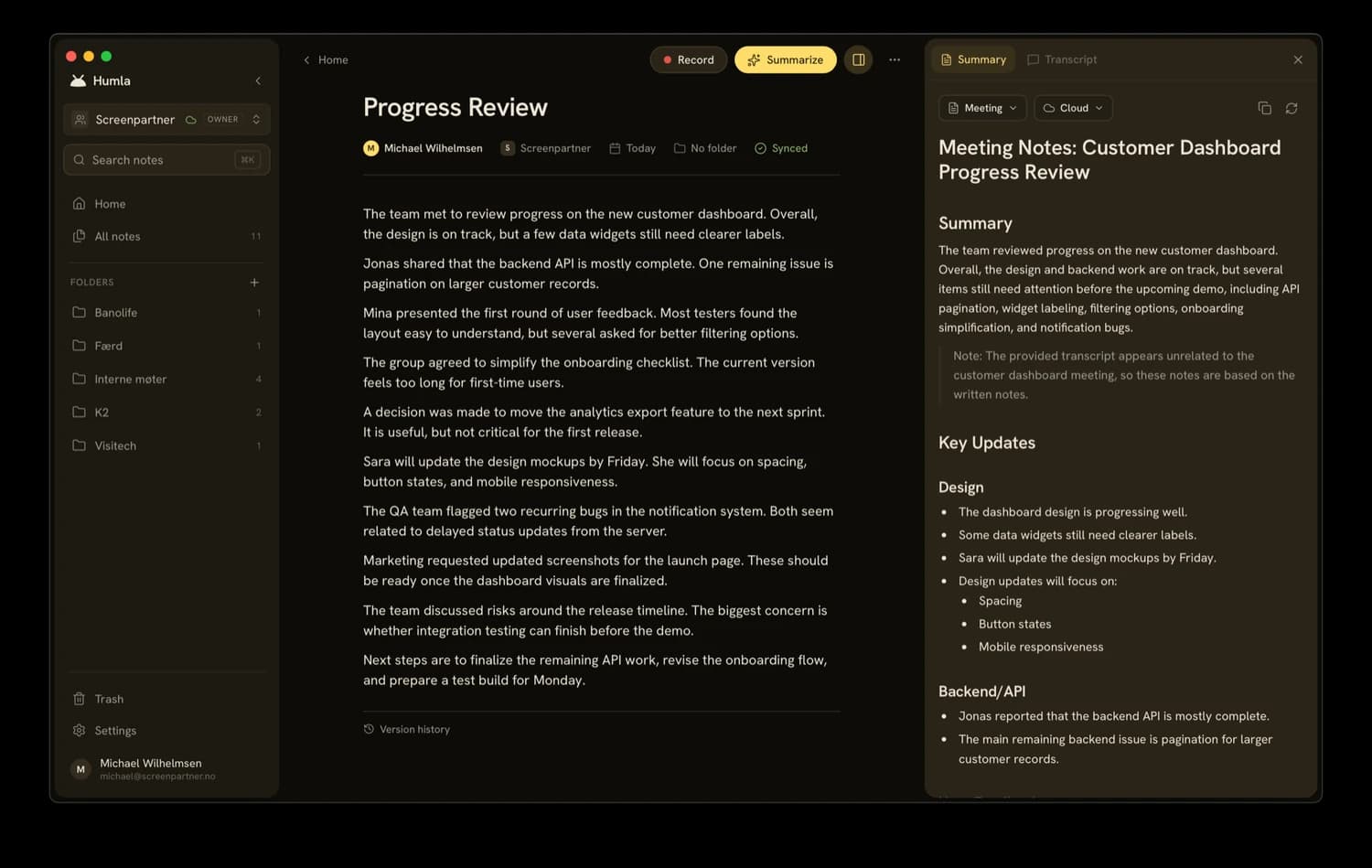
Not another meeting bot.
Blank note to sent recap, in three steps.
Walk in prepared.
Jot your agenda. Pick a style and language.
- Roadmap for Q3
- Open questions from design
- Decide launch date
Just talk.
One click records both sides. No bot. The transcript fills in live.
The write-up is waiting.
Pick a preset, hit summarize, copy. It's an email now.
New note, record, summary — that's the whole workflow. The cleanup afterwards is none, on a five-minute meeting or an hour-long one.
One meeting, every angle.
Switch the preset, hit Regenerate, and the same transcript becomes a client recap or an internal action list. The recording stays put — only the prompt changes.
Great kicking off the redesign today — here's where we landed.
A six-page rebuild on a new CMS, carrying over your brand palette, phased across ten weeks.
- Revised quote to you by Fri, Jul 18
- Brand assets back to us by Jul 22
- First sitemap draft by Jul 25
Looking forward to it. — The studio team
That's the difference from pasting a transcript into a chatbot: the prompt is already saved, the output is already the email.
Don't search your notes. Ask them.
Every note now has a chat pane. Ask a question and Humla goes digging — it searches your meeting history, reads the notes that matter, and answers with citations that jump straight to the source.
Finds the buried stuff
The right five minutes of a May call, found by meaning — works in most languages.
Answers with receipts
Chips under every answer open the note it came from.
Ask wide or narrow
This note, its folder, or everything.
Private, free, no quotas
Fully offline with Ollama, or your own key. Free forever.
Your meetings stay yours.
Free, open source, on your Mac. You don't have to take our word for any of the above.
No bot in the meeting
Clients never see a recorder join. You're just recording your Mac.
No bot in the callFully on-device mode
Local transcription and summaries. Nothing ever leaves the Mac.
100% on-deviceKeys in the macOS Keychain
API keys live in the Keychain, never in plaintext.
openai_api_key ••••••••No account, no tracking
Humla doesn't know who you are. No profile, no install ID, nothing following you around.
→ no user IDSelf-host for full residency
Run sync on your own server, in your own region.
sync.yourteam.comOpen source, auditable
MIT licensed and public. Audit every line before you trust it.
MIT · fully auditableThe free + local + open one.
An honest look. Humla wins on privacy, price, and openness; the others lead on integrations and mobile.
| Humla | Granola | Otter | Fireflies | Notion AI | ||
|---|---|---|---|---|---|---|
| Free app | + Cloud | |||||
| Records with no bot in the call | — | |||||
| Runs fully on your device | — | — | — | — | ||
| Bring your own AI model / key | — | — | — | — | ||
| Open source | — | — | — | — | ||
| AI summaries & action items | ||||||
| Chat with your notes — works offline | Cloud only | Cloud only | Cloud only | Cloud only | ||
| App integrations (Slack, CRM…) | — | — | ||||
| Mobile app | — | — | ||||
| Team & workspace sync | Self-host | |||||
| Price | Free | $5 / user | $14 / user | $20 / user | $10 / user | Per seat |
Reflects each product's standard plans as of 2026 — check their sites for the latest.
Competitor chat features checked July 2026 — cloud-only per each vendor's own docs.
The details that make it yours.
On-device speaker ID
Free, local, and it never uploads your audio.
Per-language engines
Route each language to the engine you want.
Custom vocabulary
Teach it names, jargon, and acronyms.
Full-text search
Search every note, transcript, and folder.
Click-to-edit transcript
Fix a word with a click. Playback follows along.
Signed & notarised
Opens cleanly, and updates itself.
The app is free. Forever.
Sync is the only thing you'd ever pay for — and only if you skip self-hosting.
The full app on one Mac. No account.
- Mic + system-audio recording
- On-device Whisper & speaker ID
- OpenAI / Deepgram / Groq with your key
- All summary presets + custom prompts
- MIT licensed, no tracking
Hosted sync for the whole team. Nothing to run.
- A third of Granola's or Otter's per-seat price
- Sync across all your devices
- Shared team workspaces & folders
- Managed hosting, zero setup
- 14-day free trial — start it in the app
Or self-host sync for free. Point Humla at your own PocketBase server and every team feature is yours with no subscription gate. Either way, it syncs your notes — never your keys. Read the setup guide
FAQ
Does a bot join my meetings?+
No. Humla records through macOS itself — nothing joins the call, and the other side sees nothing.
How many speakers can it tell apart?+
Speaker labels are most reliable in smaller meetings, up to about six voices. Big calls can mislabel who said what; you can rename or merge speakers by hand and re-run detection anytime.
Is my audio private?+
By default, everything stays on your Mac. Use a cloud provider and only your audio goes there, on your own account. Go fully local and nothing leaves at all.
Does Humla send any usage data?+
A few anonymous counters about setup — whether the app was opened for the first time, and whether the setup wizard was finished. Each is sent at most once per install, with no identifier attached and nothing about your meetings. The setup wizard shows the switch, and you can turn it off later under Settings → About.
Do I need an API key?+
Only for cloud engines. On-device Whisper and speaker ID are free — just download the model.
What does Humla Cloud actually do?+
It syncs notes and shares workspaces — that's all. Transcription and summaries still run on your own providers or on-device.
Can I self-host instead of paying?+
Yes. Point Humla at your own PocketBase server instead of Humla Cloud. Self-hosting has no paywall — every team feature is free.
Which languages does it handle?+
Around 100 — anything Whisper supports, auto-detected — plus a local Norwegian model. Route each language to a different engine if you like.
How is Humla different from Granola, Otter, or Notion AI?+
They're cloud products — your recordings live on their servers. Humla runs on your Mac, on your own keys, open source, and team sync costs half as much per seat.
Is there a Windows or web version?+
Not yet — Humla runs on Apple Silicon Macs (macOS 13+) for now. Want Windows or Intel? Star the repo and open an issue.
Can I chat with my notes without sending them to the cloud?+
Yes. Chat runs fully offline with local models via Ollama — the model and the search index both live on your Mac. Or bring your own OpenAI key if you prefer cloud.
Does chat cost extra?+
No. Personal chat is part of the free, open-source app — no quotas, no meters. If you chat with OpenAI you pay them for your own usage; with local models there's nothing to pay at all.